Keep a list of what you own, and what it is worth now
Write down the laptop, the camera, the motorbike, and the desk. Each item gets a purchase cost, a serial number, a place, and a warranty date. Add an estimate of its value whenever you want one. CatatKoin keeps a total for each currency.
Add your first assetFree plan, with no limit on the number of assets. Create an account and add an item in a minute.
What it does
One record for each item
Enter a name, a type, a use, and a currency. The types are Electronics, Equipment, Furniture, Vehicle, and Other. The uses are Personal, Business, and Mixed. For more detail, add the purchase cost, the purchase date, the serial number, the location, the warranty end date, and notes.
A purchase that links to an expense
Pick one of your confirmed expenses as the purchase reference. CatatKoin links the two records. It does not copy the amount, so the expense and the item stay separate.
Estimates you enter yourself
Add a dated estimate of what an item is worth. The latest estimate shows as the current value. Older estimates stay in the history, and you can correct or remove any of them.
Sold, disposed, or lost
Mark an item with a reason, a date, and a note. It leaves the Owned list but keeps its purchase details and estimates. If the item comes back, restore it to Owned.
Totals that show what is missing
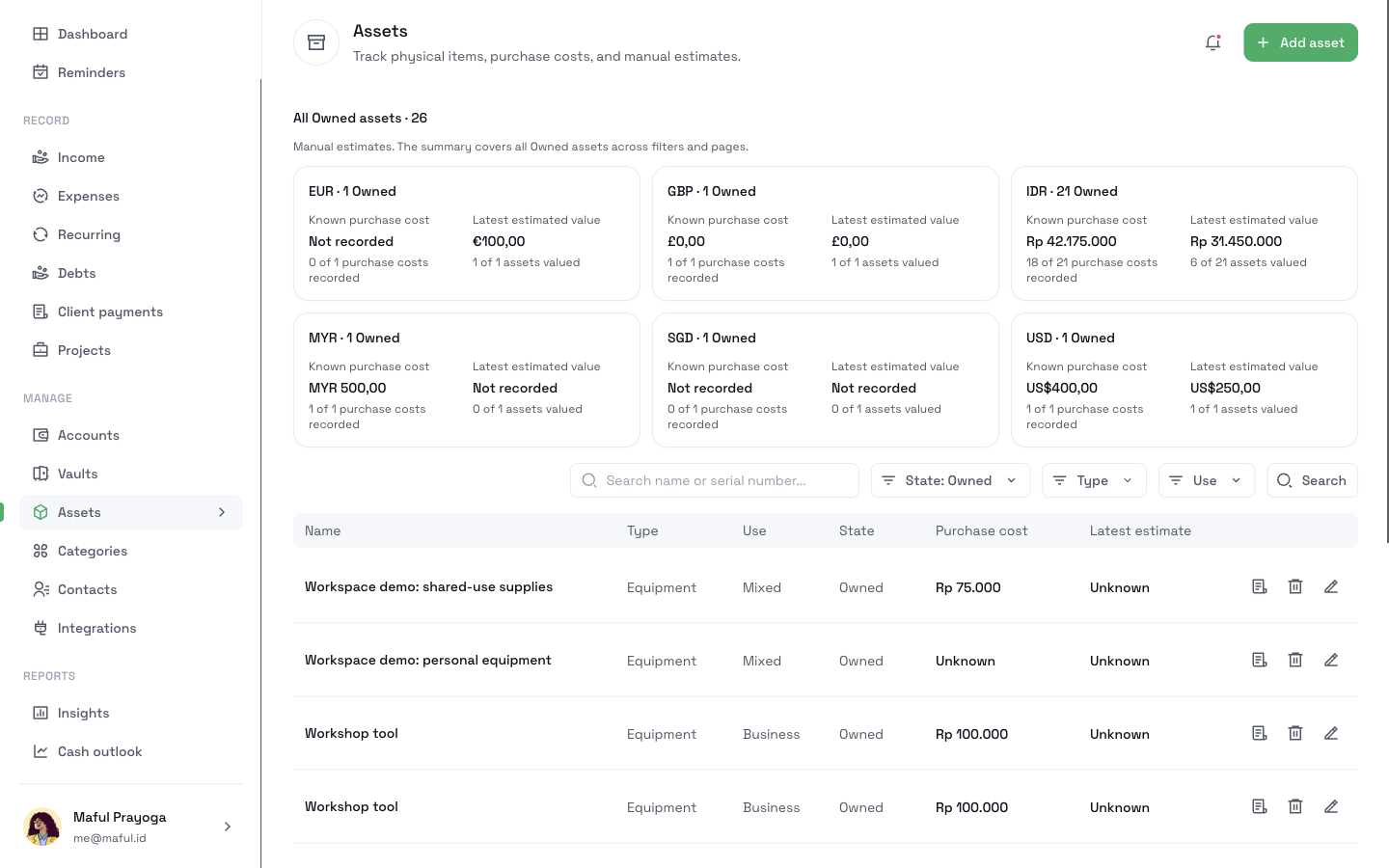
The top of the page shows one card for each currency. Each card shows the number of Owned items, the known purchase cost, and the latest estimated value. It also shows how many items have each figure, such as "18 of 21 purchase costs recorded". An unknown amount reads Not recorded. A cost of zero is not the same as an unknown cost.
A list you can filter
Filter by state, type, or use. Search by name or serial number. The totals always cover all Owned items, not only the rows on screen.
How it works
- 1
Open Assets and click Add asset.
- 2
Enter the name, the type, the use, and the currency. Add the purchase details and item details you know.
- 3
Save the asset. The totals update.
- 4
When you want a value, open the asset and add an estimate with a date.
- 5
If you sell the item, throw it away, or lose it, mark it Sold, Disposed, or Lost.
What it does not do
- It does not find a market price or track depreciation. Every value is an estimate that you enter.
- It does not move money. Adding an asset creates no expense. Marking an item Sold creates no Income.
- It does not store photos, receipts, or files.
- It sends no warranty reminder. The warranty date is a record only.
- It does not show a net worth. It adds up items in one currency and never mixes currencies.
- It is not shared. Only you see your assets. Setting an item to Business use gives no one else access.
Related pages
Keep track of subscriptions and bills
List your subscriptions, bills, and installments once. See a calendar of what is due, mark changing amounts as estimates, and get reminders in CatatKoin.
Read moreExpense tracking
Log expenses in seconds from the web, Telegram, or the API. Sort them into categories and vaults, review drafts, and export a CSV. No bank login needed.
Read moreWorkspaces
Keep personal and business money apart with private Workspaces. Switch with one click, move records with a preview, and archive a finished business.
Read moreKnow what you own before you need to prove it
Add the items that matter first. A serial number and a purchase date are enough to start.
Add your first asset